Deterministic Workflows
Same workflow, same steps, same order. Not "hopefully the agent remembers to test."
You don't need to hire a dev team. You need to define one. Tamandua gives you a team of specialized AI agents — planner, developer, verifier, tester, reviewer — that work together in reliable, repeatable workflows. One install. Zero infrastructure.
curl -fsSL https://raw.githubusercontent.com/igorhvr/tamandua/main/scripts/install.sh | bashOr just tell your pi agent: “Clone github.com/igorhvr/tamandua to my home dir, install it and learn the skill included inside it.”
Get Started
Same workflow, same steps, same order. Not "hopefully the agent remembers to test."
The developer doesn't mark their own homework. A separate verifier checks every story against acceptance criteria.
Each agent gets a clean session. No context window bloat. No hallucinated state from 50 messages ago.
Failed steps retry automatically. Steps can reroute back to upstream producers for correction via on_fail.retry_step (bounded by a max_reroutes budget, default 2). When the budget exhausts, the run fails permanently. Nothing fails silently.
Checking for work is a database peek, not a model call. Agents spawn only when a step is ready, and completion nudges make step-to-step latency near zero.
Tamandua ships with 23 bundled workflows organized into six families. Use tamandua workflow list to see available workflows, and tamandua workflow install <id> to install one.
Worktree variants (*-worktree, *-merge-worktree) run in a detached git worktree created from your origin repository. Your main working copy stays untouched until the workflow completes. This gives you full isolation — continue working while agents iterate — and a clean abort path: delete the worktree and nothing in your origin repo has changed.
When a merge workflow (-merge, -merge-worktree) fails at the finalize_merge step and the base branch tip has moved since the run started, Tamandua automatically launches a fresh replacement run with the same parameters. This "rugpull" detection runs after the final merge failure — if the base branch stayed put, no replacement is triggered. Pass --no-relaunch-upon-rugpull to workflow run to suppress the automatic replacement.
Story-based feature development. The planner decomposes your task into ordered user stories. Each story goes through implement → verify → test before the next one starts.
| Variant | Workflow ID | Agents | Pipeline |
|---|---|---|---|
| Local-only | feature-dev |
5 | plan → setup → implement → verify → test |
| + Merge | feature-dev-merge |
6 | plan → setup → implement → verify → test → finalize_merge |
| Worktree | feature-dev-worktree |
5 | plan → setup → implement → verify → test |
| Worktree + Merge | feature-dev-merge-worktree |
6 | plan → setup → implement → verify → test → finalize_merge |
| GitHub PR | feature-dev-github-pr |
6 | plan → setup → implement → verify → test → pr → review |
Bug triage and fix. The triager reproduces the bug, the investigator finds the root cause, the fixer patches it, and the verifier confirms the fix against acceptance criteria.
| Variant | Workflow ID | Agents | Pipeline |
|---|---|---|---|
| Local-only | bug-fix |
5 | triage → investigate → setup → fix → verify |
| + Merge | bug-fix-merge |
6 | triage → investigate → setup → fix → verify → finalize_merge |
| Worktree | bug-fix-worktree |
5 | triage → investigate → setup → fix → verify |
| Worktree + Merge | bug-fix-merge-worktree |
6 | triage → investigate → setup → fix → verify → finalize_merge |
| GitHub PR | bug-fix-github-pr |
6 | triage → investigate → setup → fix → verify → pr |
Vulnerability scanning and patching. Scans for vulnerabilities, ranks by severity, patches each one, re-audits after all fixes are applied, and runs regression tests.
| Variant | Workflow ID | Agents | Pipeline |
|---|---|---|---|
| Local-only | security-audit |
6 | scan → prioritize → setup → fix → verify → test |
| + Merge | security-audit-merge |
7 | scan → prioritize → setup → fix → verify → test → finalize_merge |
| Worktree | security-audit-worktree |
6 | scan → prioritize → setup → fix → verify → test |
| Worktree + Merge | security-audit-merge-worktree |
7 | scan → prioritize → setup → fix → verify → test → finalize_merge |
| GitHub PR | security-audit-github-pr |
7 | scan → prioritize → setup → fix → verify → test → pr |
Detect failing tests, disable them minimally, and iterate until the full test suite passes. Useful for establishing a clean baseline on a branch with known test failures.
| Variant | Workflow ID | Agents | Pipeline |
|---|---|---|---|
| Local-only | quarantine-broken-tests |
3 | setup → quarantine → verify |
| + Merge | quarantine-broken-tests-merge |
4 | setup → quarantine → verify → finalize_merge |
| Worktree + Merge | quarantine-broken-tests-merge-worktree |
4 | setup → quarantine → verify → finalize_merge |
Single-agent workflows for quick one-off tasks and workflow auto-selection.
| Workflow ID | Agents | Pipeline | Description |
|---|---|---|---|
do-now |
1 | execute | Submit any task. Get back a success/failure report. No planning, no stories. |
just-do-it |
1 | dispatch | Describe what you want. Dispatches to the most appropriate workflow automatically. For coding tasks (feature-dev*, bug-fix*, security-audit*) it defaults to merge-worktree variants unless the prompt gives a specific reason otherwise. |
do-review-do-verify |
3 | do → review → do-again → verify | Two-pass execution: do the work, review it, revise, then verify the result. |
Workflows for auditing and validating the project itself.
| Workflow ID | Agents | Pipeline | Description |
|---|---|---|---|
frontend-test |
1 | test | Builds the project and validates the dashboard frontend: HTML structure, route definitions, and test coverage. Does not start a second dashboard daemon. |
skills-normalize-audit |
3 | scan → audit → report | Scans a skills directory, analyzes the skills for overlaps and redundancies, and produces consolidation recommendations in a structured report. |
Install all bundled workflows at once with:
$ tamandua workflow install --allcurl -fsSL https://raw.githubusercontent.com/igorhvr/tamandua/main/scripts/install.sh | bashOr just tell your agent: "Clone github.com/igorhvr/tamandua to my home dir, install it and learn the skill included inside it."
git clone https://github.com/igorhvr/tamandua.git
cd tamandua
./build-and-install
Or step by step:
./build        # npm install + tsc
./install      # symlink into ~/.local/bin
The build script handles everything: checks Node.js >= 22, runs npm install, compiles TypeScript. The install script creates a symlink at ~/.local/bin/tamandua pointed at your checkout — so you can keep the source wherever you like and tamandua stays in sync.
gh CLI for PR creation stepsNot on npm. Tamandua is installed from source (or GitHub), not the npm registry.
Same workflow, same steps, same order. Not "hopefully the agent remembers to test."
The developer doesn't mark their own homework. A separate verifier checks every story against acceptance criteria.
Each agent gets a clean session. No context window bloat. No hallucinated state from 50 messages ago.
Failed steps retry automatically. Steps can reroute back to upstream producers for correction via on_fail.retry_step (bounded by a max_reroutes budget, default 2). When the budget exhausts, the run fails permanently. Nothing fails silently.
Checking for work is a database peek, not a model call — agents spawn only when a step is ready. Idle runs cost zero tokens.
Agents and steps in YAML. Each agent gets a persona, workspace, and strict acceptance criteria. No ambiguity about who does what.
One command provisions everything: agent workspaces, scheduling, subagent permissions. No Docker, no queues, no external services.
The scheduler checks for work deterministically — a database peek, not a model call — and spawns an agent the moment a step is ready. Claim, work, pass context to the next agent. SQLite tracks state.
YAML + SQLite + deterministic dispatch. That's it. No Redis, no Kafka, no container orchestrator. Tamandua is a TypeScript CLI with zero external dependencies. It runs wherever pi runs. And because checking for work never invokes a model, idle runs cost zero tokens — you pay for the work your agents do, not for the waiting.
$ tamandua workflow install feature-dev

# Or install all bundled workflows at once
$ tamandua workflow install --all
✓ Installed workflow: feature-dev

$ tamandua workflow run feature-dev "Add user authentication with OAuth"
Run: a1fdf573
Workflow: feature-dev
Status: running

$ tamandua workflow status "OAuth"
Run: a1fdf573
Workflow: feature-dev
Steps:
  [done   ] plan (planner)
  [done   ] setup (setup)
  [running] implement (developer)  Stories: 3/7 done
  [pending] verify (verifier)
[pending] test (tester)When you start the management dashboard (tamandua dashboard), Tamandua automatically starts the remote MCP server too.
http://localhost:3334http://localhost:3338/mcp (fixed port)Use tamandua dashboard status to verify both endpoints are up.
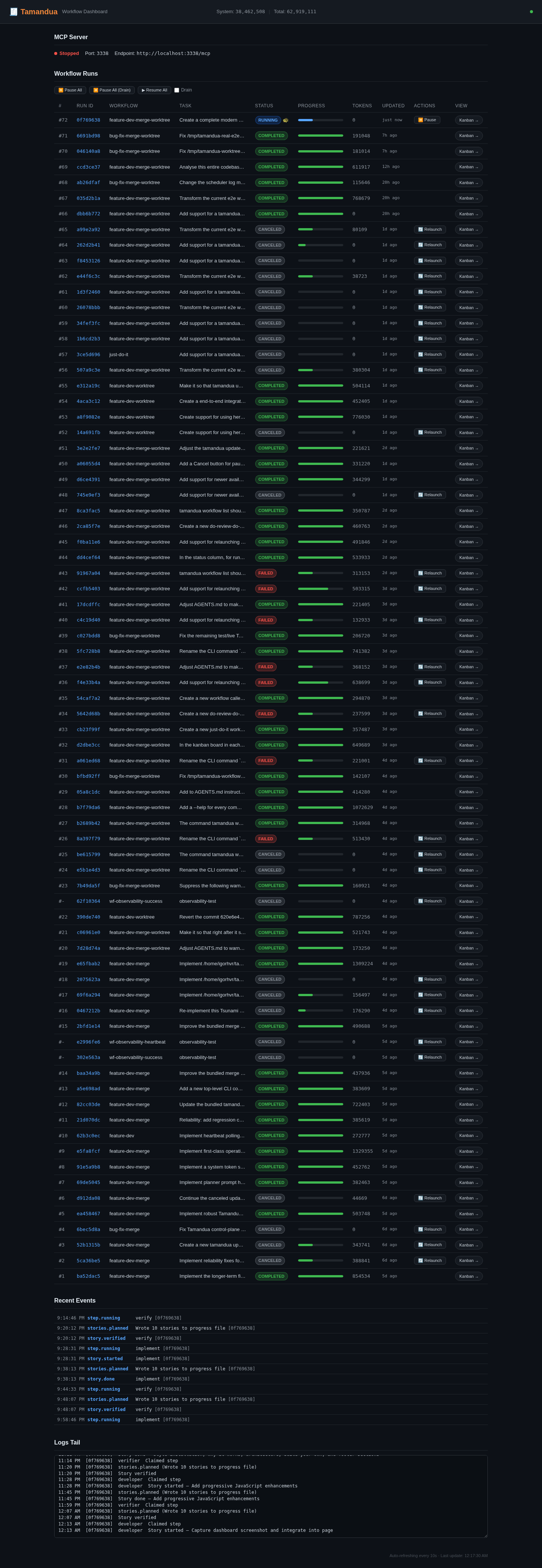
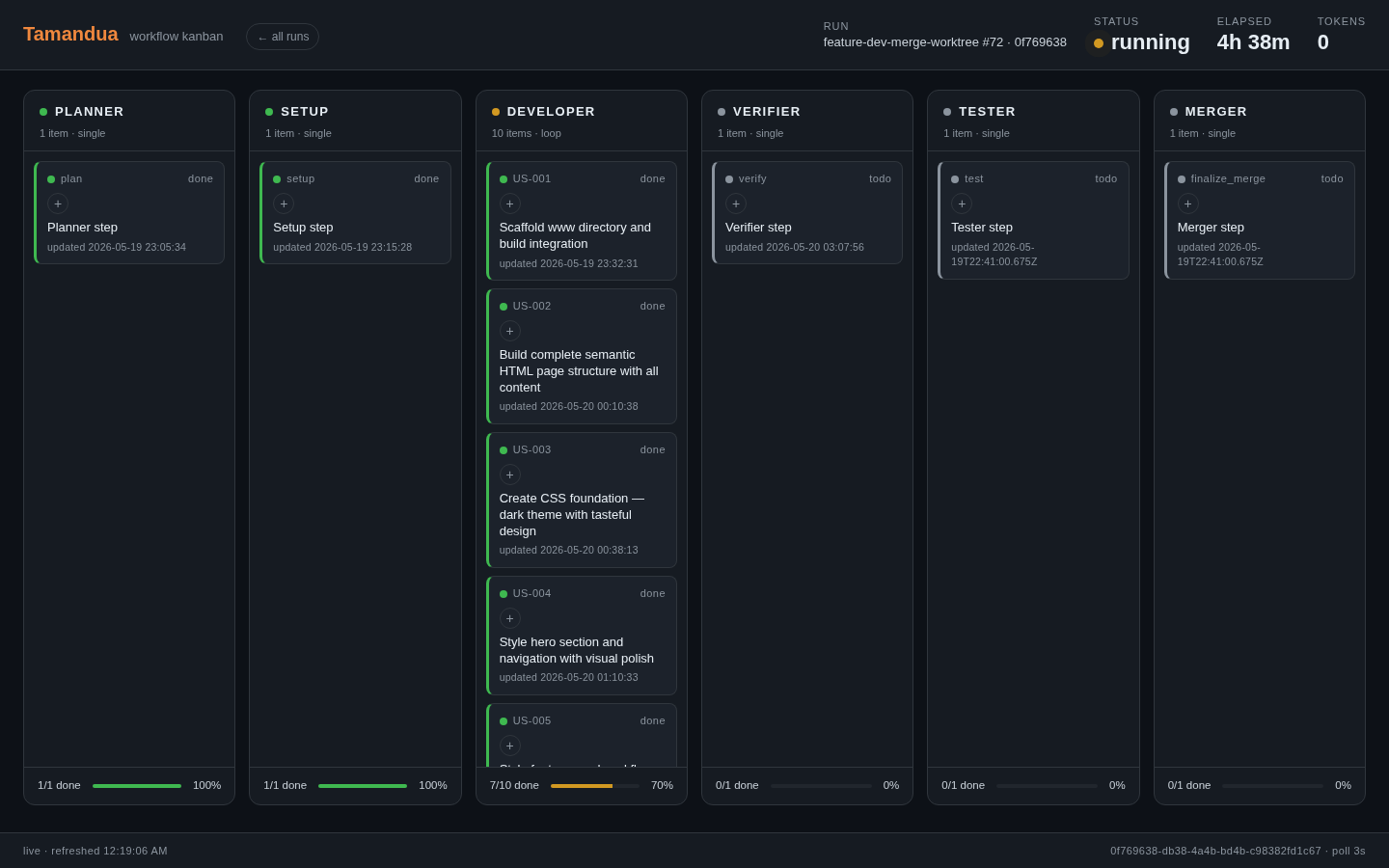
http://localhost:3334 — real-time view of workflow runs, step status, and agent activity.Each run also has a swim-lane Kanban view at http://localhost:3334/runs/<run-id>/kanban. Lanes are derived dynamically from the workflow's steps. Single steps render one card per lane; loop steps render one card per story. Cards are colour-coded by status (todo / running / done / failed).
Tamandua includes native AutoResearch primitives for measurable optimization loops. Unlike a normal workflow, AutoResearch stores durable project-local state so an agent can resume after restarts, learn from each measured run, and choose the next experiment from evidence.
Use AutoResearch when the task has a reliable numeric metric and the agent should run a sequence of experiments instead of one batch of edits — raising test coverage, reducing validation loss, improving latency, or lowering cost while preserving correctness.
tamandua autoresearch init \
  --goal "reduce validation loss" \
  --metric val_bpb \
  --direction lower \
  --command "uv run train.py"

tamandua autoresearch run-experiment
tamandua autoresearch log-experiment --status auto \
  --description "try lower learning rate" \
  --hypothesis "smaller LR improves stability" \
  --learned "validation improved but training slowed" \
  --next-focus "test warmup schedule"
tamandua autoresearch next
The core loop is init → run-experiment → log-experiment → next. log --status auto classifies a run as baseline, keep, discard, crash, or checks_failed by comparing the latest metric with prior accepted results. The next prompt carries the ratchet: it restates the goal, best result, last learning, and next focus before the agent starts another experiment.
| File | Purpose |
|---|---|
autoresearch.config.json |
Session config: goal, metric, direction, command, parser, checks. |
autoresearch.md |
Agent-facing objective and operating loop. |
autoresearch.jsonl |
Append-only run history: measured results, decisions, learning, next focus. |
autoresearch.sh |
Benchmark command. |
autoresearch.checks.sh |
Optional correctness checks run after successful measurements. |
The dashboard's AutoResearch panel reads the run's harness working directory, discovers the nearest autoresearch.config.json / autoresearch.jsonl, and renders the experiment trace — gray points are attempted experiments; green points and the green line are the kept best-so-far frontier. A SQLite session registry makes every AutoResearch project discoverable from the dashboard, and tamandua autoresearch prune cleans up stale registry entries without touching project files.
| Command | Description |
|---|---|
tamandua get-ready |
Install bundled workflows and start dashboard/control plane. |
tamandua workflow run <id> <task> |
Start a run (defaults harness CWD to your current directory). |
tamandua workflow status <query> |
Check run status by run id, prefix, or task substring. |
tamandua workflow runs |
List all runs. |
tamandua workflow resume <run-id> |
Resume a failed run. |
tamandua dashboard |
Start the web dashboard (also starts remote MCP on port 3338). |
tamandua dashboard start|stop|restart|status [--port N] |
Manage the dashboard daemon. |
tamandua mcp start|stop|restart|status [--port N] |
Manage the standalone MCP server. |
tamandua control-plane start|stop|restart|status [--port N] |
Manage the standalone control plane. |
tamandua logs-tail |
Follow recent activity as new events arrive. |
tamandua nudge |
Trigger an immediate dispatch round for all running runs. |
tamandua doctor |
One-shot diagnostic with per-check remedies (environment, services, database, prompt adherence). |
tamandua update |
Pull the source checkout, rebuild, reinstall workflows, restart services. |
By default, Tamandua uses pi (pi --print) as its agent harness. Override it per run with mutually exclusive flags on tamandua workflow run:
| Flag | Description |
|---|---|
--pi-as-harness |
Use pi as the agent harness. This is the default. |
--hermes-as-harness |
Use Hermes as a supported alternative harness to pi. |
--dsh-as-harness |
Use DeepSeek Harness (dsh) instead of pi. Alpha quality: token accounting is best-effort (read from dsh session files), and the model comes from your dsh profile. Use pi for production workflows. |
To use a custom Hermes binary, set TAMANDUA_HERMES_BINARY; otherwise Tamandua searches for hermes on your PATH. To use a custom dsh binary, set TAMANDUA_DSH_BINARY; otherwise Tamandua searches for dsh on your PATH. Harness validation runs at scheduling time — a missing or non-executable binary fails the run immediately with a clear error.
The bundled workflows are starting points. Define your own agents, steps, retry logic, and verification gates in plain YAML and Markdown. If you can write a prompt, you can build a workflow.
id: my-workflow
name: My Custom Workflow
agents:
  - id: researcher
    name: Researcher
    workspace:
      files:
        AGENTS.md: agents/researcher/AGENTS.md

steps:
  - id: research
    agent: researcher
    input: |
      Research {{task}} and report findings.
      Reply with STATUS: done and FINDINGS: ...
expects: "STATUS: done"Skill included. The tamandua-agents skill is bundled and is excellent at allowing your agents to build-and-forget with tamandua. The CLI itself is also designed in a way that is easy for agents in general to grasp. Remote MCP tools are exposed so agents can query runs, start workflows, and check status autonomously.
The remote MCP endpoint exposes 14 tools at http://localhost:3338/mcp:
| Tool | Description |
|---|---|
tamandua.runs.list |
List recent Tamandua workflow runs. Accepts optional limit (integer, 1–200, default 50). |
tamandua.run.status |
Fetch detailed status for a run. Requires query (run id, prefix, or task substring). |
tamandua.run.start |
Start a workflow run. Requires workflowId and taskTitle. |
tamandua.run.pause |
Pause a running workflow run. Requires runId. Optional drain (boolean) to wait for in-flight work before pausing. |
tamandua.run.resume |
Resume a paused workflow run. Requires runId. |
tamandua.run.delete |
Permanently delete a workflow run and associated steps, stories, and worktree metadata. Requires runId. Optional force (boolean) cancels and deletes running or paused runs. |
| Parameter | Required | Description |
|---|---|---|
workflowId |
Yes | Workflow id to run. |
taskTitle |
Yes | Task description for the workflow run. |
workingDirectoryForHarness |
For direct workflows | Harness working directory for remote MCP runs. Required for direct workflows, invalid for worktree workflows. |
worktreeOriginRepository |
For worktree workflows | Repository path to create the worktree from. Required for worktree workflows, invalid for direct workflows. |
worktreeOriginRef |
No | Git ref (branch, tag, SHA) for the worktree. Only valid for worktree workflows. |
noHurrySaveTokensMode |
No | When true, work spawns prefer the harness's token-saver command from PATH (pi-token-saver for pi runs, hermes-token-saver for hermes runs, dsh-token-saver for dsh runs), looked up per invocation; falls back to the plain harness command when absent. Idle dispatch is free either way. Defaults to false. |
workingDirectoryForHarness and worktreeOriginRepository are mutually exclusive: direct workflows require the former, worktree workflows require the latter.
| Tool | Description |
|---|---|
tamandua.events.recent |
List recent global Tamandua events. Accepts optional limit (integer, 1–500, default 50). |
tamandua.source.path |
Return the local Tamandua source checkout path. No parameters. |
tamandua.skill.path |
Return the path to the bundled tamandua-agents agent skill. No parameters. |
tamandua.update.command |
Return local CLI guidance for updating Tamandua safely. No parameters. |
| Tool | Description |
|---|---|
tamandua.autoresearch.init |
Create project-local AutoResearch state. Requires cwd, goal, metricName, direction, and command. Optional metricUnit, metricRegex, checksCommand, and overwrite. |
tamandua.autoresearch.run_experiment |
Run the configured experiment command in cwd, parse the metric, run optional checks, and append a run_result. Optional command, metricRegex, checksCommand, and timeoutMs. |
tamandua.autoresearch.log_experiment |
Append the decision and learning for the latest run. Requires cwd and description; optional status, metric, hypothesis, learned, nextFocus, commit, and revertDiscard. |
tamandua.autoresearch.status |
Summarize baseline, best result, failures, and the next ratchet prompt for cwd. |
You're installing agent teams that run code on your machine. We take that seriously.